E. Kenneth Hoffman
Department of Communication
Seton Hall University
Paint Systems
Computers use a binary system of notation for remembering numbers. That
is, computers can only count from zero to one instead of zero to ten. The
computer tracks the thousands of pieces of information by assigning
a binary code to each character we type, or dot of color we create on the
computer
graphics screen. The code collects a series of 0's and 1's in an eight
digit series called a Byte. Technically, the zeros indicate that there
is no electronic
charge at a given spot in the computer memory, and ones indicate that
there is an electronic charge present. Each digit in the code is called
a binary digit
(bit). Electronically, the computer must be able to store the code
in its Random Access Memory (RAM). To do so it assigns to each memory location
the condition of being "on" or "off." If the location is on, it has
an electrical charge (signified by "1"), if it is off it does not (signified
by "0").
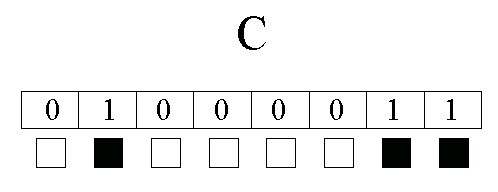
The eight bit code (one Byte of information) tells us which bits are
on and which are off. If the computer checks its memory at a given location
and finds
01000011, this binary code translates into the number 67. Sixty-seven
on the ASCII (pronounced "Ask-ee," an acronym for American Standard Code
for Information Interchange) conversion chart of alpha/numeric characters
equals the letter "C." The computer display adapter (card connected
to the
monitor) translates the code into the letter we see on the screen.
On the same ASCII table we find that the number 64 (01000000) represents
the
character "@". Other characters use different combinations of 1's and
0's. It is important to remember that a Byte can represent anything we
want it to
represent. The number 67 (0100011) can be a letter of the alphabet
or a color value at a given spot on the color monitor. The images we see
on the
screen are stored in a frame buffer.
Frame - As in film or movie frame
Buffer - A temporary place to store computer information going to a
peripheral. A frame buffer is specifically reserved for holding screen
information,.
Printer buffers hold text and other information waiting to be printed,
and keyboard buffers temporally hold key strokes.
The graphics boards we use in the computer graphics laboratory are set
to display 800 pixels across the screen per line by 600 lines. A number
is
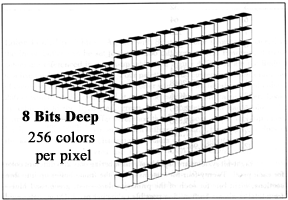
assigned to each pixel representing a color. A pixel eight bits deep
can hold any of 256 different colors, a numeric value from 0 to 255 for
each pixel. The complete screen image, called a "bit map," is stored in
a place in computer memory known as the screen buffer, a storage place
in RAM where the screen image is kept while it is being sent to the monitor.
Buffers temporarily hold data en route to a peripheral so that the data
can be quickly accessed when it is needed. A screen buffer is specifically
reserved for holding screen information. Printer buffers hold text
and other printer information waiting to be printed, and keyboard buffers
temporally hold key strokes.
Pixels may have several levels of color intensity depending on how much
information is stored in RAM for each pixel. For example, if the amount
of
memory available for each pixel is only one bit deep the pixel can
only be on or offlike the letters on a monochrome text monitorthere
are no shades
of gray. If there are two bits of memory for each pixel, the pixel
can be one of four shades. Four bits of memory per pixel allow 16 shades
or colors.
The amount of information doubles for each additional bit of memory.
2 bits allow 4 colors
3 bits allow 8 colors
4 bits allow 16 colors
5 bits allow 32 colors
6 bits allow 64 colors
7 bits allow 128 colors
8 bits allow 256 colors
9 bits allow 512 colors
10 bits allow 1024 colors
11 bits allow 2048 colors
12 bits allow 4096 colors
16 bits allow 65,536 colors
24 bits allow 16,777,216 colors
32 bits allow 4,294,967,296 colors
Most paint systems use the "HLS" color modifying system which lets you
independently control the hue, luminosity, and saturation of each color
on the screen. Hue is the actual color you select from the spectrum of
colors availablered, orange, yellow, green, blue, indigo, violet
and shades inbetween. Luminosity (also called "brightness" in PhotoShop
or "value") is the brightness of the color. Saturation is the amount of
color in the shade that you have selected. Fully saturated colors are vivid.
Colors with less saturation show more gray and look colorless. With the
HLS (HSB in Photoshop) you ustomize colors by mixing the amount of
hue, luminosity and saturation. In some cases the software will allow you
to "ramp" a series of eight or more colors at once by selecting the
first and last colors. The palette editor then automatically creates the
inbetween shades and stores the new color values in the look-up table.
Once stored you can use this special palette with later images.
Pixel-based images, sometimes called raster images because of the "raster"
of lines that make up a television screen, they can be saved to disk by
recording the numeric value for each pixel in the image. Recall the
image from disk or from computer RAM and the numeric values are converted
back into the actual color by the graphics board.
Look-Up Tables-- (Used on systems witch display 256 colors or less per
pixel.)
A pixel with eight bits of color information stored in the frame buffer
can be set to any of 256 different colors. However, if these colors are
referenced in a "look-up" table, you are not limited to a palette of 256
colors. Your palette can be customized from a rainbow of color possibilities.
Many systems
offer you 16.8 million theoretical colors, 256 of which can be displayed
at one time using an eight bit frame buffer. Look-up tables hold the RGB
(red,
green, blue) information for each color. The numbers in the frame buffer
reference the 256 places in the look-up table. Each place holds information
about a different color. Changing the colors in the look-up table means
changing the colors on the computer screen. Systems that use a look-up
table are called "pseudo-color" systems because the colors are indexed
to the look-up table. If a different look-up table is substituted after
a picture is drawn, all of the colors in the drawing change to match the
colors in the new look-up table. Systems with 15 bits or more of color
per pixel do not use look-up tables because each pixel has enough memory
in the frame buffer to store an ample variety of colors. They are called
"high color" systems and no look-up table is needed. Systems with a minimum
of 24 bits of color per pixel are "true color" systems because they generate
photo-realistic color images. Note that if a different look-up table has
been substituted for the original, then a different color will appear on
the screen. For this reason look-up tables are also called color maps.
An artist can create a different color map for each pictureor
many color maps for a single picture, each color map being a different
interpretation. If you want to change a spring scene into a winter
scene, no need to redraw it, simply create a new color map with winter
colors replacing the spring colors.
Grid Assignment