E. Kenneth Hoffman
Department of Communication
Seton Hall University
Introduction
-
My Background
-
Reasons for taking the class; expectations for the class;
prior cg experience (software, graphics, computers, photography).
-
What do you expect to learn from the course?
-
Course Objectives:
-
Introduction to professional computer graphics applications:
Paint and 3D modeling
-
Adobe Photoshop
-
Discreet 3D Studio Max
-
Using Windows operating system
-
Using the Internet:
-
Finding Clip art
-
Researching a term paper
-
Software help assistance
-
Finding training exercises for specific software
-
Appreciation of computer graphics as an art form
-
Communication department graphics laboratories
-
Description: Macintosh, DOS/Windows
-
History
-
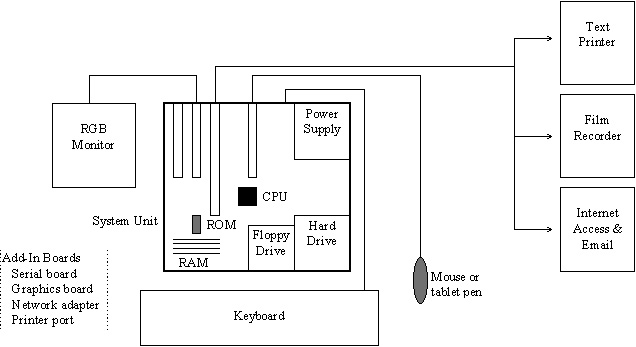
What is a computer graphics workstation?
-
Hardware components
-
-
System unit (See Glossary)
-
CPU
-
Memory: RAM (temporary storage) volatile , ROM
-
Disk drives (mass storage)
-
Power supply
-
Graphics card
-
MODEM
-
Peripherals (I/O devices)
-
Keyboard
-
Monitors
-
Printers: examples of output
-
Desktop scanner
-
Digitizing tablet
-
Mouse
-
Camera
-
Personal Animation Recorder
-
Software:
-
OS
-
Applications
-
Magazines
-
Planet Studio (603) 472-2419
-
3D Artist http://www.3dartist.com/
(505)820-6929
-
Animation Magazine (818) 991-2884
-
Multimedia Producer http://www.kipinet.com/
-
Wired Magazine http://www.hotwired.com
-
Show examples from prior classes
-
Graphlab accounts
-
Booting the computer and logging on to the LAN and workstation
-
Software application icons
-
Zip Drives--250 MB disks
-
Utilities
-
File management (listing, coping, deleting)
-
Saving your work (Z drive for network)
-
Bits and Bytes:
-
Bit--(BInary digiT) The smallest element of computer storage.
It is a single digit in a binary number (0 or 1). The bit is physically
a transistor or capacitor in a memory cell, a magnetic spot on disk or
tape or a high or low voltage pulsing through a circuit.
-
Byte--The common unit of computer storage from micro to mainframe.
It is made up of eight binary digits (bits). A ninth bit may be used in
the memory circuits as a parity bit for error checking. A byte holds the
equivalent of a single character, such as the letter A, a dollar sign or
decimal point. For numbers, a byte can hold a single decimal digit (0 to
9), two numeric digits (packed decimal) or a number from 0 to 255 (binary
numbers).
-
3 ½ inch floppies hold 1.44 MB of information. (1,440,000
bytes). A double spaced typewritten page (27 lines of text) is approximately
2160 bytes.
-
Zip disk hold 250 MB of information